
Understand your reach
How many guests open your Smart Page, where they come from and what they tap: every figure in Reach explained.
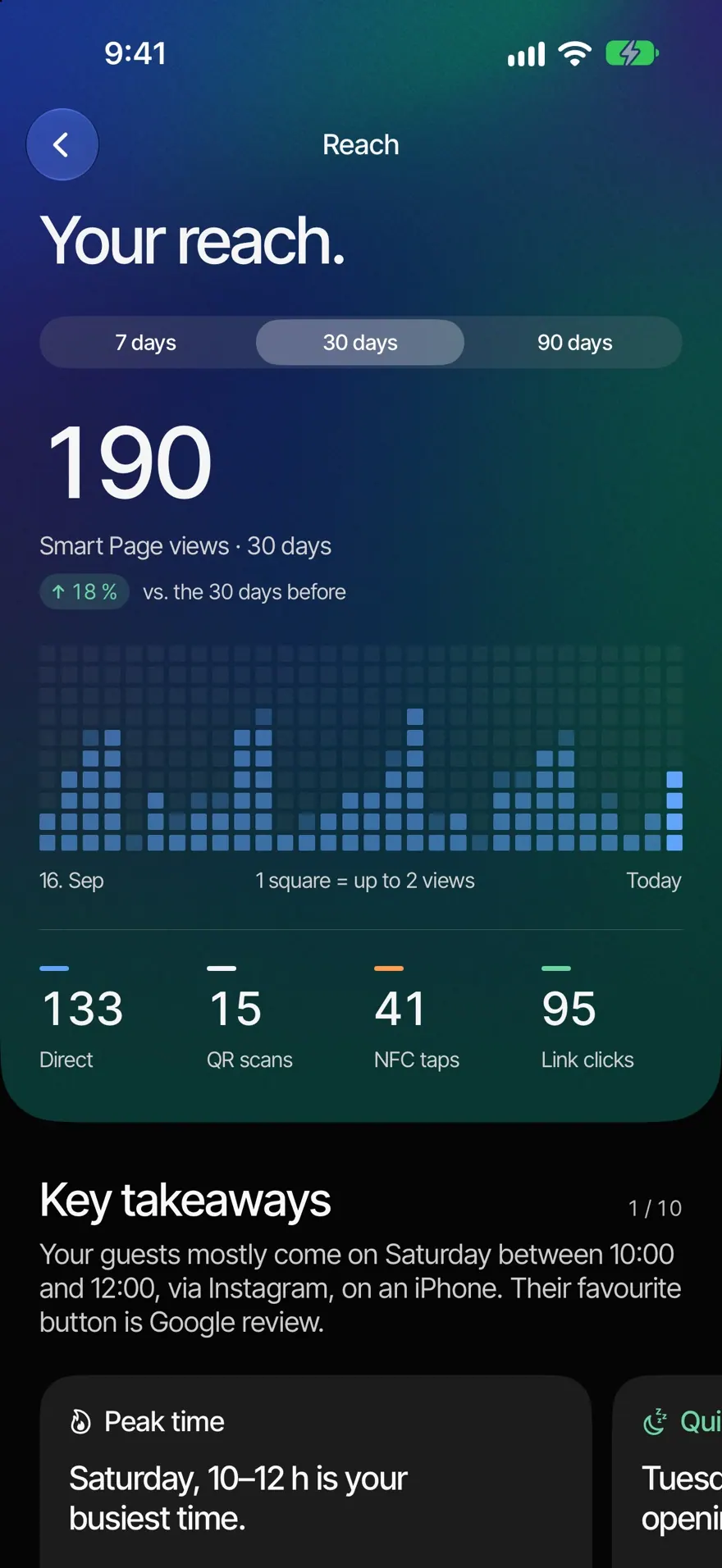
Reach shows how often guests open your Smart Page and what they do there. That way you see whether your NFC stickers, your QR code and your links are working.
Open Reach
- Open the Home tab.
- Tap the Reach card. The "Your reach." page opens.
- Choose the period at the top: 7 days, 30 days or 90 days.
The figures cover all your locations together. To refresh, pull the page down.
The figures at the top
- "Smart Page views" in the chosen period, next to the comparison with the period before.
- The chart shows each day as squares, or each week for 90 days. Tap a day to see its views.
- "Via links": views through your link, meaning shared, typed in or opened from an app such as Instagram.
- "QR scans" and "NFC taps": views through your connected products. Scans of the QR code from Smart Page›Share also count as "QR scans".
- "Link clicks": taps on buttons of your page, such as Call, Directions or Review.
In detail
Under "Key takeaways" you'll find insights from your numbers, see Key takeaways. Tiles follow below. Tiles with an arrow open the full list.
- "Where they come from": the platforms guests came through, see Where guests come from.
- "Most tapped" and "Tap something": your most popular button, and what percentage of visits tap something.
- "When they come": weekdays and times of day. Lighter squares show your opening hours.
- "Top product", "Devices" and, with several locations, "Locations compared".
- With a menu: "Most opened", "Searches" and "What guests search for". Search words only appear from three different visits.
- "Since the start": all visits since the first day.
How we count in the "Since the start" tile explains exactly what is counted; see also How we count.
Common questions
Why does it say "No visits yet"? Nobody opened your page in the chosen period. Share your link or connect a product.
I see "Your reach couldn't be loaded. Pull down to try again." Check your internet connection and pull the page down.
Can I look at a single location? Reach shows all locations together. The "Locations compared" tile shows views and clicks per location.