
Confirming or declining requests
If you confirm requests yourself, new bookings wait for your okay. Here's how to confirm them, or decline them with a reason.
If Confirm requests yourself is switched on in the booking rules, a new booking starts as a request. You decide whether to accept it.
Where you see requests
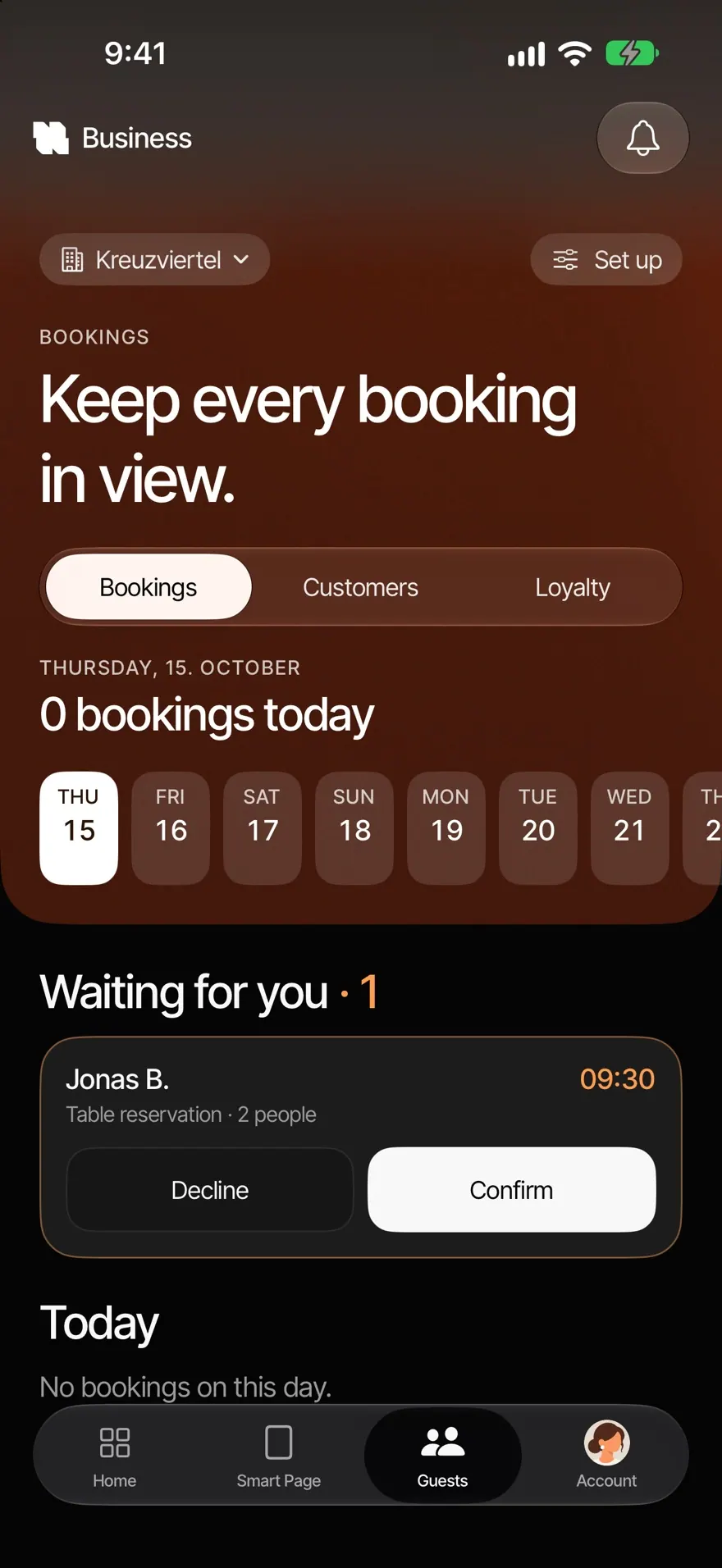
- In Guests›Bookings under "Waiting for you".
- On Home under "Up next".
- On your iPhone's Lock Screen, see Notifications and Live Activity.
Confirm a request
- Tap the request. You see the time, number of people, occasion, the note from the guest, phone, email and the 6-digit reference. At the top it shows by when you should answer, for example "Waiting for you · answer by 12:45".
- Tap Confirm. The guest gets a confirmation by email.
Decline a request
- Tap the request, then Decline.
- Choose a reason: "We are closed", "No space left" or "Another reason". Tap Continue.
- Tap Decline request. If you'd like to speak to the guest first, tap Call the guest first.
- You see "Declined." The spot is free again.
The guest gets an email. With "We are closed" and "No space left", it gives the reason. Any other reason stays with you.
Good to know
- If you don't answer within the "Time to confirm", the request expires and the guest gets an email.
- With read-only access you see requests, but no buttons to answer them.
Common questions
Where do I find the booking number? In the booking under "Reference". The guest has the same 6-digit number.
I don't want to confirm requests at all. Switch off Confirm requests yourself in the booking rules. Bookings are then confirmed instantly.
Was this helpful?